Walkthrough
How to order with CSSBuy, step by step
CSSBuy runs two routes. Buy For Me is when CSSBuy purchases on your behalf. Ship For Me is when you bought something yourself and had it sent to their warehouse. Both are six steps, and both are shown below with the actual screens from CSSBuy's own shipping guide.
Two things decide most of the experience. You pay twice, once for the goods and once for international shipping. And nothing leaves the warehouse until you select it and submit it. Everything below makes more sense once those two are in your head.
Route one: Buy For Me
Six steps, from a link you copied to a parcel you have confirmed. This is the route most people use.
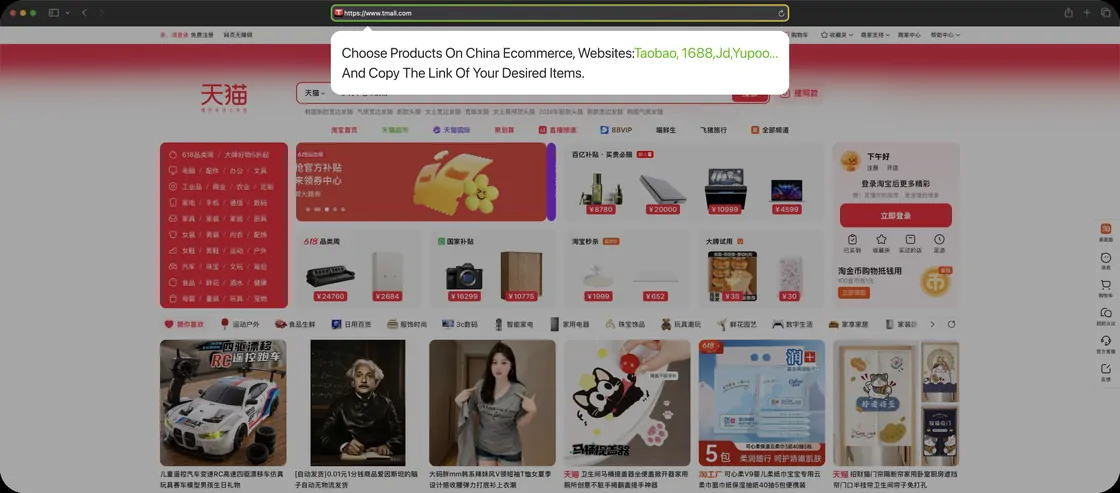
Select item
Find what you want, either in the catalogue or on the marketplace itself, and copy the link. CSSBuy handles Taobao, 1688, JD, Yupoo and the rest from a single search field.
Copy the whole address including the item identifier at the end. Share buttons and messaging apps routinely shorten links, and a trimmed link is the most common reason a search comes back with nothing.
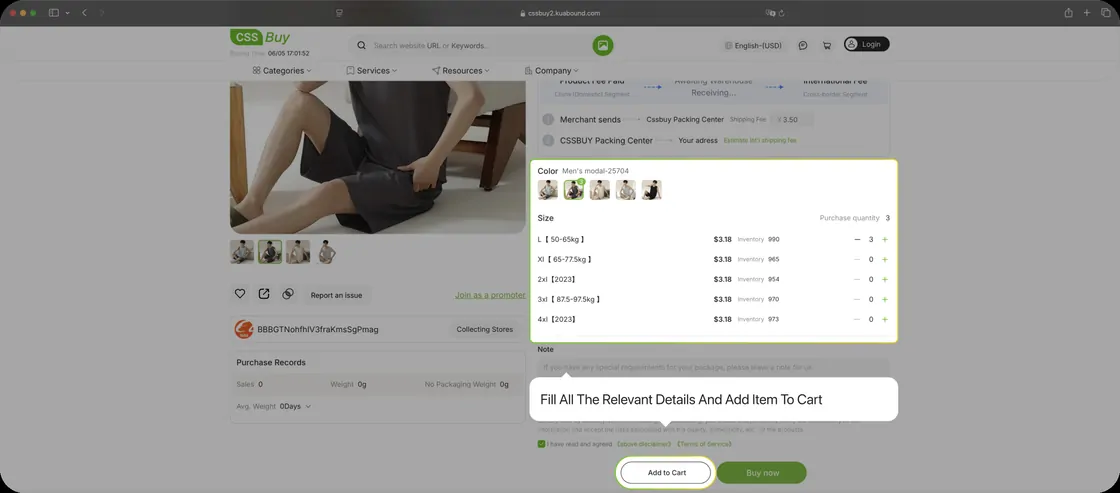
Submit order
Paste the link into CSSBuy and the item opens with its real options attached. Fill in every relevant detail, colour, size, quantity, then add it to the cart.
Two warnings sit on this screen and both are easy to scroll past. Some goods are restricted for international delivery, and most 1688 listings carry a minimum order quantity set by the supplier rather than by CSSBuy.
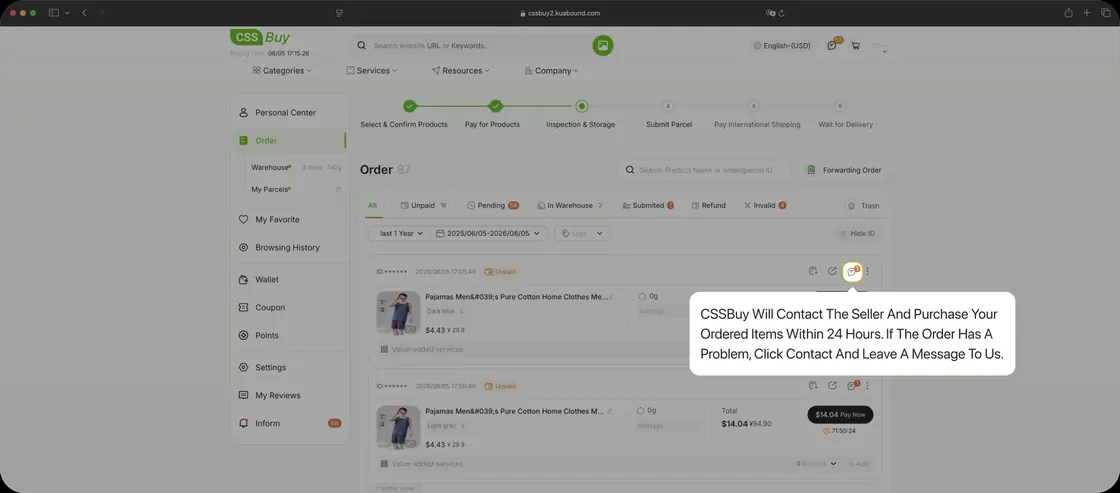
CSSBuy purchase
You pay for the goods and their Chinese domestic postage, and CSSBuy contacts the seller and buys them, usually within 24 hours.
This is the first of two payments. International shipping is charged separately later, and budgeting only for this one is where most first orders go wrong. If anything is unclear, use the contact link on the order itself so the thread keeps the context.
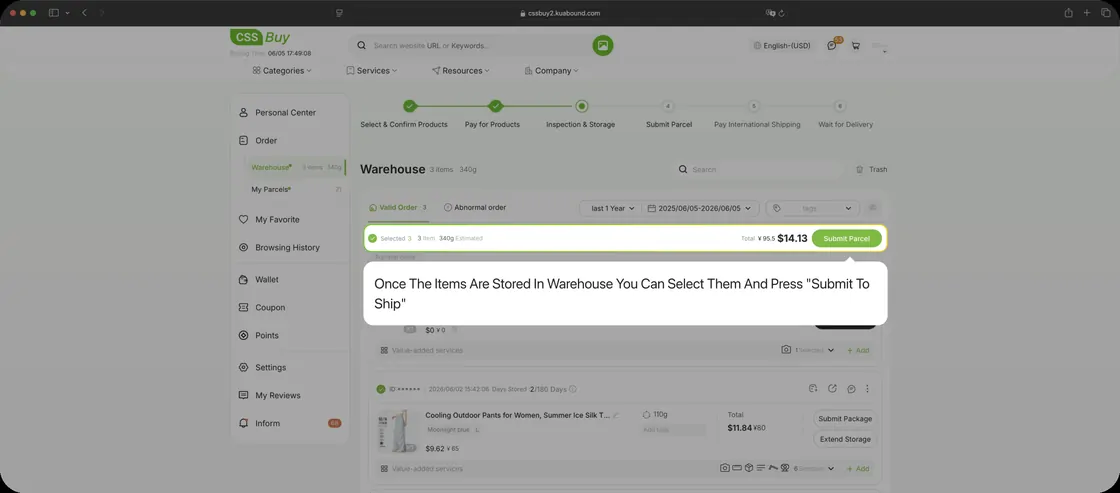
Submit for delivery
Goods arrive at the warehouse, get inspected and photographed, and then wait. Nothing moves on its own. When you are ready, open the warehouse, select the items you want in this box and press Submit To Ship.
This is where consolidation happens. Several orders bought weeks apart travel as one parcel and you pay the expensive first weight charge once instead of once per item.
CSSBuy delivery
Choose the address and shipping method, then pay the international shipping deposit. The parcel is packed, weighed and dispatched.
The tracking number appears on the My Parcels page, but not instantly: CSSBuy states it takes roughly two to four days to update after packing. A quiet tracking field in that window is normal rather than a problem.
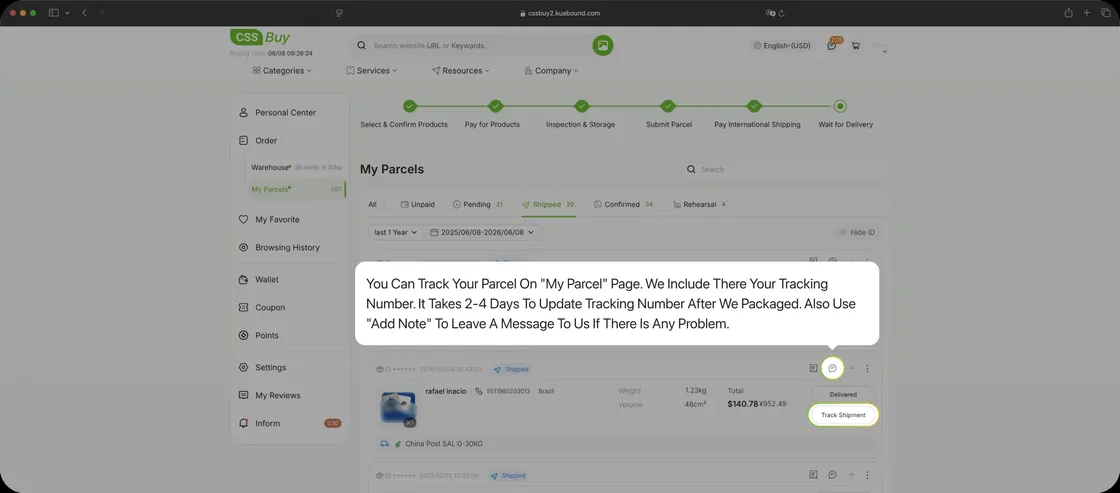
Delivery and review
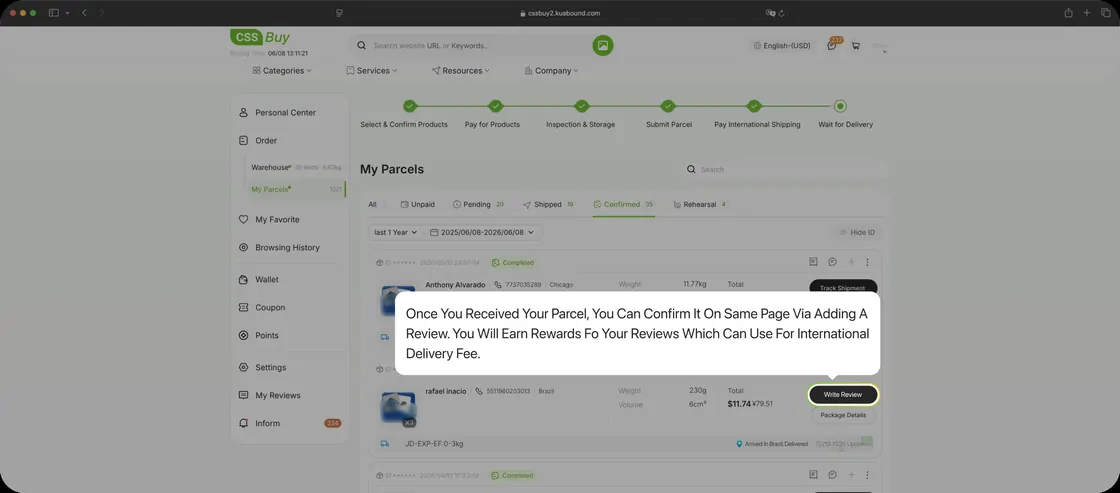
When the parcel arrives, confirm it on the same page and leave a review. Reviews earn rewards that offset future international shipping costs.
If something is wrong, raise it here rather than opening a fresh ticket. The parcel thread already carries the item, the inspection photos and the history.
Route two: Ship For Me
For goods you already bought. The first four steps differ, then the two routes merge completely.
Get address
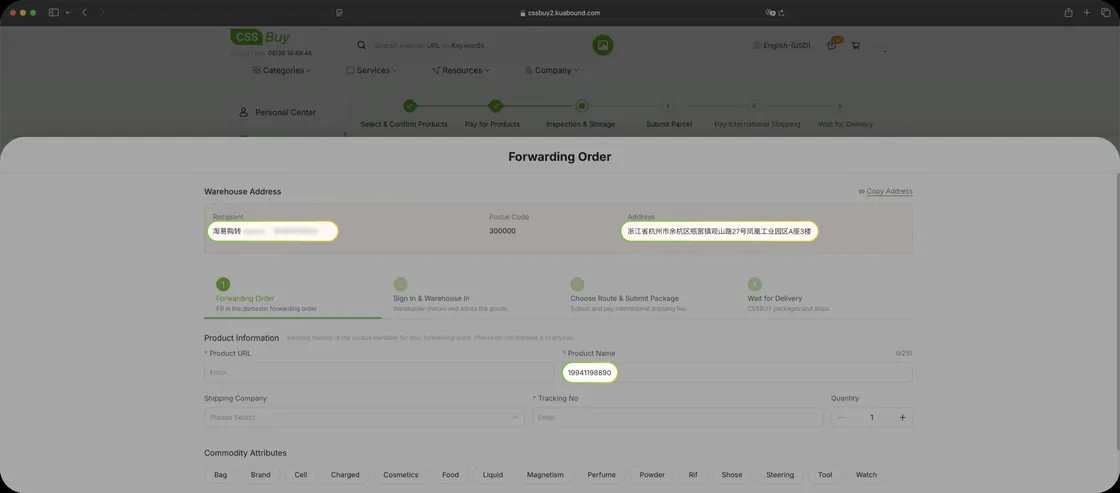
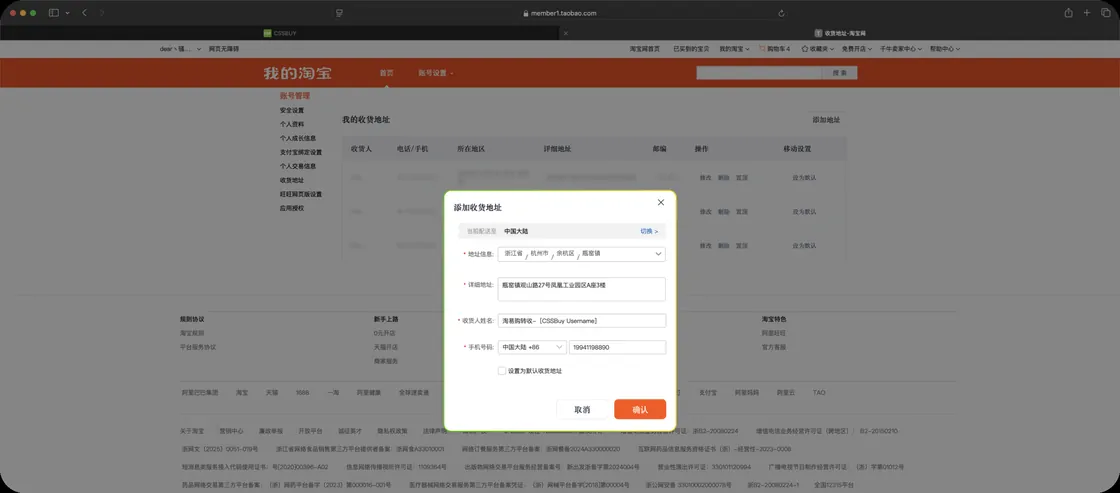
Ship For Me is the route for goods you bought yourself. CSSBuy issues your account a Chinese warehouse address, and you use that as the delivery address when checking out on the seller's own site.
That second step happens on a Chinese interface, because it is the seller's checkout rather than anything belonging to CSSBuy.
Submit order
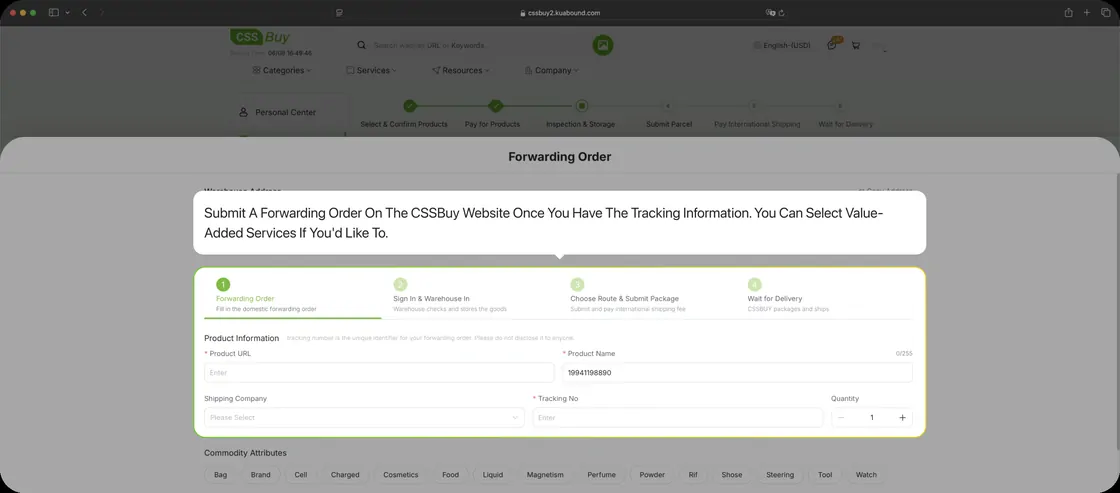
Once the seller gives you tracking information, submit a forwarding order on CSSBuy so the incoming parcel can be matched to your account. Value added services can be selected at this point.
Do this when you place the order, not when the box turns up. Warehouses receive a great many near identical packages and the tracking number is the only thing that separates yours from everyone else's.
CSSBuy storage
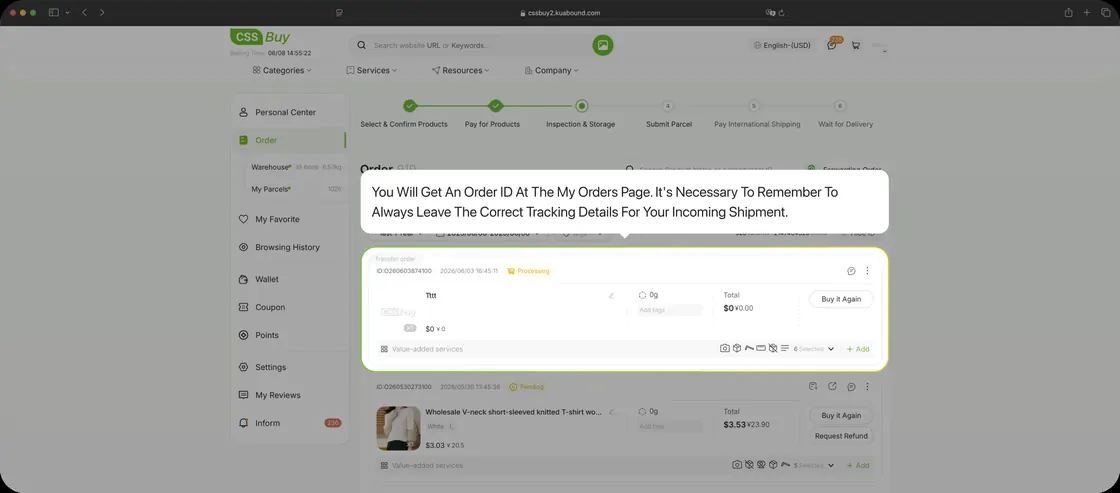
You get an order ID on the My Orders page. Keeping the tracking details correct there is what lets the warehouse match your parcel when it lands.
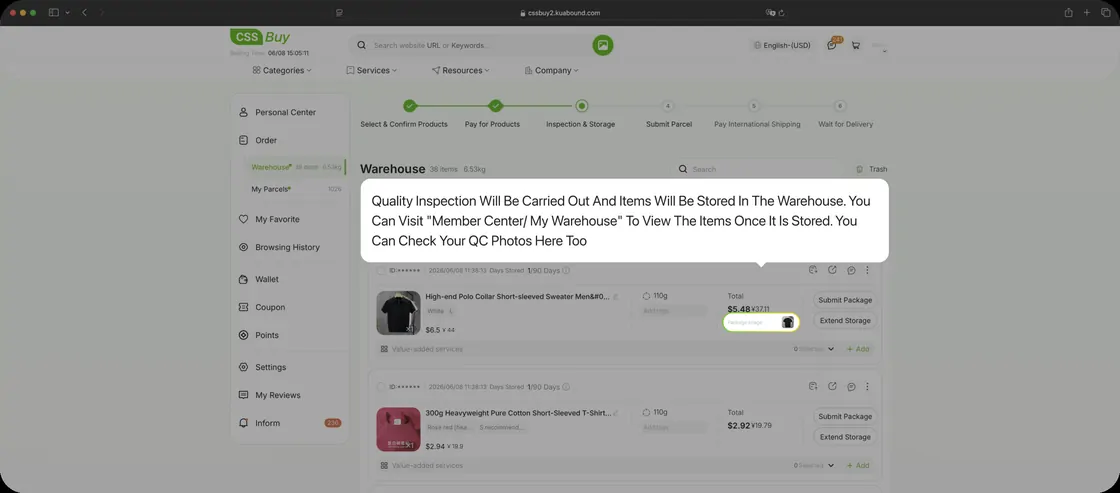
On arrival, quality inspection is carried out and the goods are stored. Your QC photos appear under Member Center and My Warehouse, which is where you look before deciding whether to ship or to raise a problem.
Submit for delivery
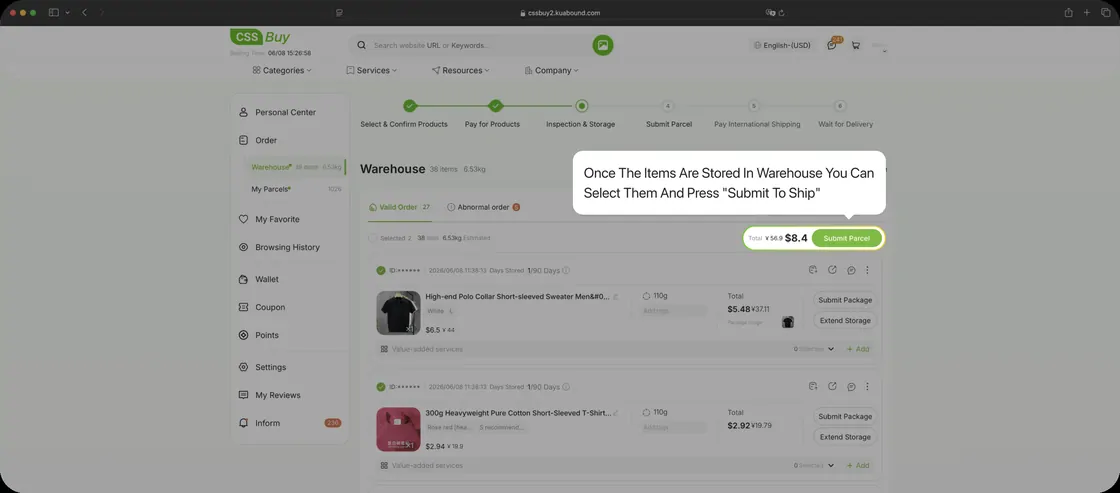
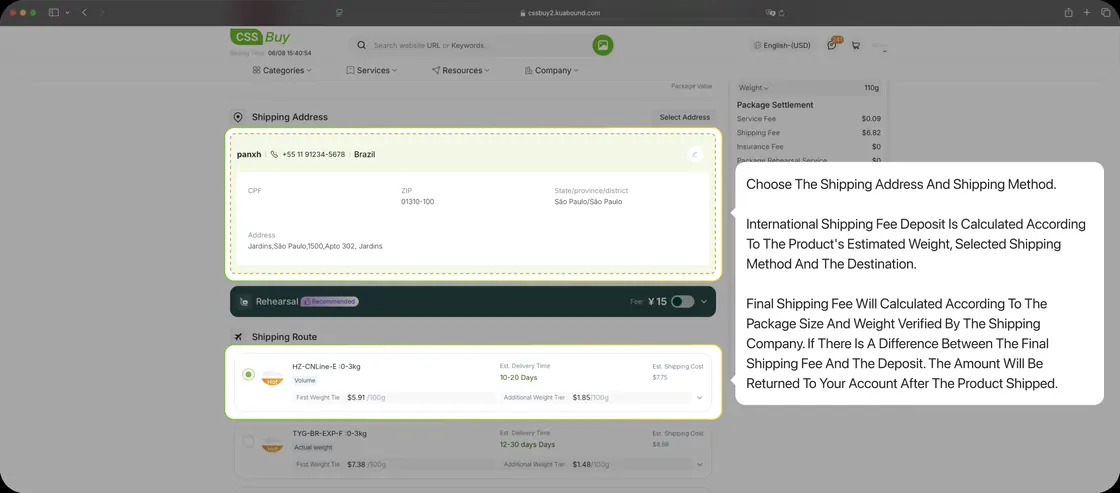
Same mechanism as the other route: select stored items, press Submit To Ship, choose address and shipping method.
What you pay is a deposit, calculated from the estimated weight, the line you picked and your destination. The carrier then verifies the real package size and weight, and any difference between the final fee and your deposit is returned to your account after the parcel ships.
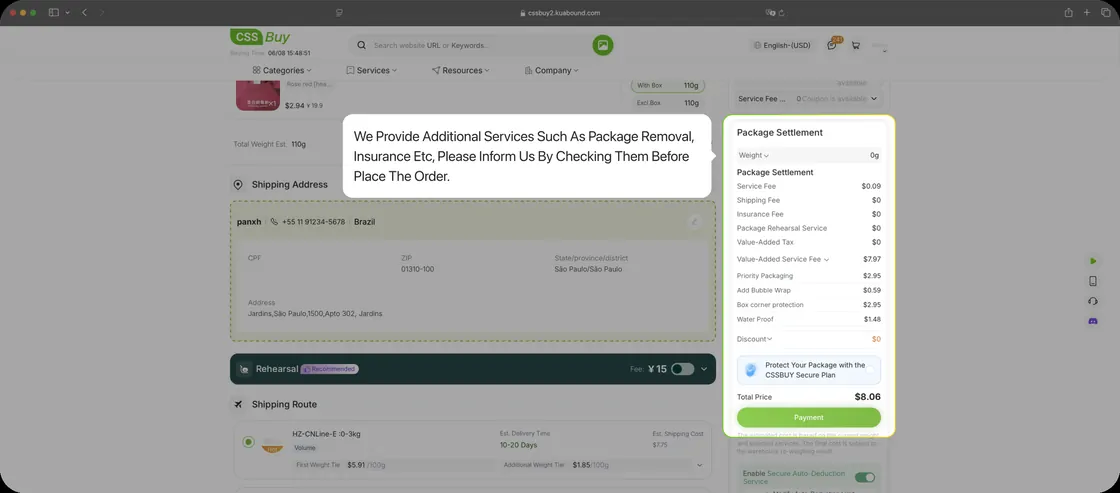
Optional services such as removing packaging or adding insurance are requested by ticking them before you place the order, not afterwards.
Steps five and six are the same on both routes. CSSBuy delivery, then delivery and review. Once your goods are packed and dispatched, the tracking page, the two to four day tracking delay, the confirmation and the review rewards work exactly as described under Buy For Me above.
Questions about the process
Five things the screens do not spell out
Which route am I on?
If CSSBuy buys the item for you, that is Buy For Me. If you bought it yourself and had it delivered to the CSSBuy warehouse address, that is Ship For Me. The difference only affects the first half. Once goods are in the warehouse, storage, consolidation, shipping and review work identically.
Can I add something to a box after submitting it?
Not once it is submitted. Weight and packing are calculated from what you selected. An extra item belongs in the next shipment, or you cancel and resubmit before packing starts. This is the argument for waiting until everything has landed before pushing anything out.
Why has my tracking number not appeared?
Because it takes about two to four days to update after packing, according to CSSBuy's own guide. Silence inside that window is expected. Past it, use Add Note on the parcel so the query arrives with its history attached.
Why did shipping cost more than the calculator suggested?
The calculator works from estimated weight. Carriers bill on the verified package size and weight, so a light but bulky parcel is charged for the space it occupies. Removing packaging at the packing step is offered for exactly this reason.
What does restricted for international delivery mean in practice?
That some carriers will not take it. Batteries, liquids, powders and certain branded goods each hit different rules depending on the line and the destination country. The practical effect is a shorter list of shipping options, sometimes down to one. Check before you buy rather than after.
You have the process. Now the judgement.
Knowing which buttons to press is the easy part. Deciding whether a listing deserves your money is what takes practice.